About Nextpad++ for Mac and Linux
Last updated: · Project started March 1, 2026 · Free & open source under GPL v3
Nextpad++ for Mac is a full and free macOS port of Notepad++. A real Mac app, not a Wine wrapper: Objective-C++ on top of Scintilla and Cocoa, shipped as a Universal Binary for Apple Silicon (M1–M5) and Intel Macs, code-signed and notarized for Gatekeeper, maintained in the open by the community.
An Independent Community Port of Notepad++ to Mac
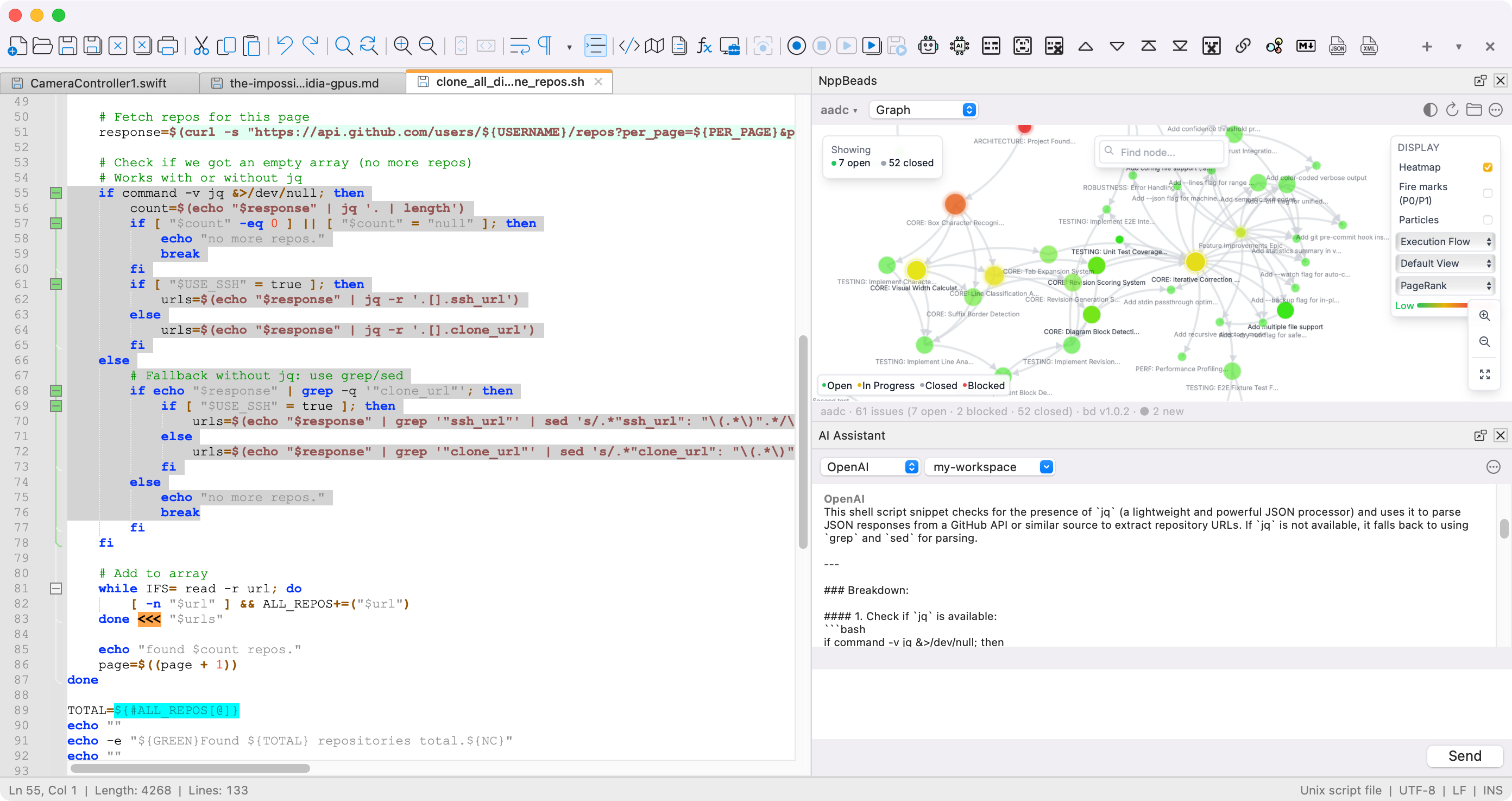
Nextpad++ for Mac is a native macOS application, not a Windows binary running under Wine or CrossOver, and it's an independent port of the upstream Notepad++ codebase.
Notepad++ has been one of the most popular text editors on Windows for more than 20 years, with millions of downloads. Mac users never got their turn. This independent project finally gives them one, bringing Notepad++ and its growing catalog of ported plugins to the Mac. For the Official Windows version, visit notepad-plus-plus.org.
An Independent Community Port of Notepad++ to Linux
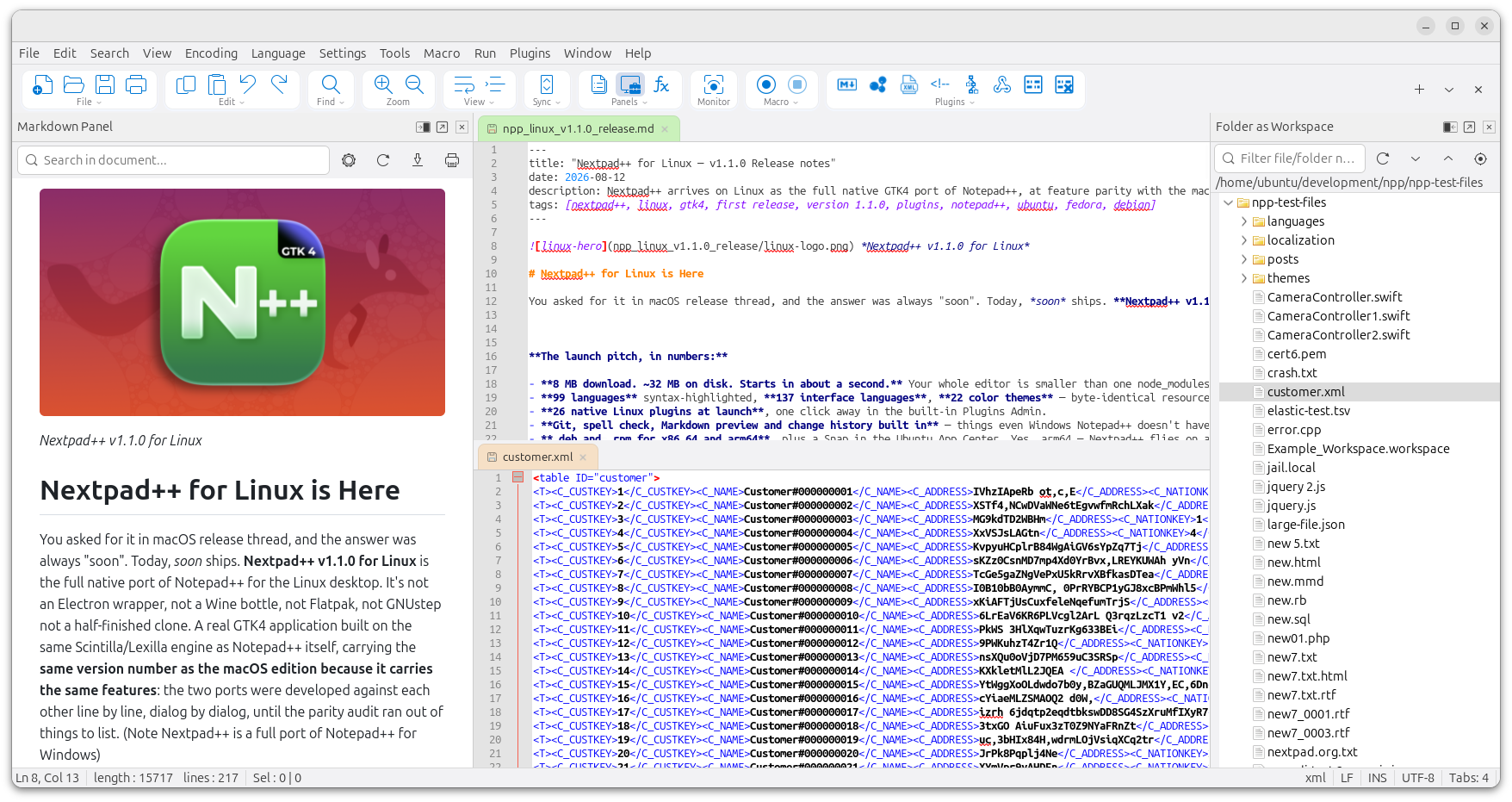
Nextpad++ for Linux is a native GTK4 application — not an Electron wrapper, not a Wine bottle, not Flatpak, not GNUstep, and not a half-finished clone. It's the same independent port of the upstream Notepad++ codebase, built for the Linux desktop.
It ships at feature parity with the macOS edition from day one and carries the same version number because it carries the same features: the two ports were developed against each other line by line, dialog by dialog, until the parity audit ran out of things to list. 99 languages syntax-highlighted, 137 interface languages, 22 themes — byte-identical resources with the macOS and Windows editions — in a 5 MB download that installs in seconds on Ubuntu, Fedora, Debian, Mint, openSUSE and Arch. Read the full Linux v1.1.0 release notes or head straight to the Linux download page.
Why Build Nextpad++ for Mac and Linux?
For two decades Notepad++ was Windows-only. Mac users who switched from Windows, or who worked across both platforms, had to choose between giving up the editor and running it through a Wine or CrossOver compatibility layer that always almost felt right but never quite did. Searches like "is there a Notepad++ for Mac" and "why no Notepad++ on Mac" have been answered with the same shrug for years.
Notepad++ is tightly coupled to the Win32 API. Windows, menus, dialogs, shortcuts, file pickers: all written against Win32. You can't just recompile Notepad++ for macOS. The Windows UI layer has to be replaced with a native Cocoa one, in Apple's language, while the C++ editing core (Scintilla included) stays in sync with upstream.
Linux users were in the same position, and the usual answers were the same compromises: Wine, an Electron lookalike, or a clone that stopped short. The Linux port solves it the same way the Mac port did — the Win32 UI layer replaced with a native GTK4 one, the editing core untouched. Both ports now ship together, same version numbers, same features, same plugins.
The goal isn't to reinvent Notepad++ or build something "Notepad++ inspired." It's to give Mac users the real thing: same menus, same shortcuts, muscle memory intact, plugins that still work. Apple Silicon native. Gatekeeper-signed. If you've used Notepad++ on Windows, it should feel like coming home.
Maintainer
Nextpad++ for Mac and Linux is maintained by Andrew Letov, an independent developer who leads both native layers and coordinates plugin-porting across the community. Andrew wrote the Objective-C++ Cocoa UI that replaces Notepad++'s Win32 front-end on macOS, and the C/GTK4 UI that does the same on Linux. He ported the plugin host on both platforms — loading native .dylib plugins on macOS and .so plugins on Linux — and set up the signing, notarization and packaging pipelines that ship every release for both.
The project is run in the open on GitHub at github.com/nextpad-plus-plus. Issues, discussions, and pull requests are welcome from anyone who wants to help. Read more on the Author page, or find Andrew's other work at aletik.me.
How Nextpad++ for Mac and Linux Was Built
Nextpad++ for Mac is a native macOS application. It compiles against Apple's frameworks directly, from the original Notepad++ source tree, without Wine, Rosetta, or any compatibility layer in between.
The port is written in Objective-C++, which lets you mix C++ and Objective-C in the same file. The Mac version shares most of its editing logic with upstream and uses native Cocoa APIs for the UI layer: windows, menus, dialogs, toolbars, file pickers, shortcuts, clipboard, drag-and-drop, and the macOS document architecture.
The core editing component is Scintilla, the same mature engine used by upstream Notepad++, SciTE, and many other editors. Scintilla comes with 20+ years of work on syntax highlighting, folding, bracket matching, and layout, and upstream fixes flow into the Mac build with minimal friction.
The binary ships as a Universal Binary with native ARM64 (Apple Silicon) and x86_64 (Intel) slices, so Notepad++ runs at native speed on M1, M2, M3, M4, and M5 Macs without Rosetta, and on older Intel Macs down to macOS 11. The plugin system was reimplemented to load macOS dynamic libraries (.dylib); plugins are ported individually by the community. See the Plugins page for current status and the Online Help for user documentation.
The Linux edition follows the same architecture with a different native layer: written in C on GTK4, on the same Scintilla/Lexilla engine, with the Win32 UI replaced by GTK widgets — real menus, real dialogs, dark mode, and GPU-accelerated rendering through GTK4's scene graph. It runs natively on both Wayland and X11 and ships as .deb and .rpm packages for x86_64 and arm64, plus a Snap in the Ubuntu App Center. Config files use the same schema as the Mac and Windows editions, so config.xml, shortcuts.xml, themes and User Defined Languages move between platforms unchanged. The Linux plugin host loads shared libraries (.so) and speaks a strict superset of the macOS plugin API, so a plugin ported once can target both.
Technology Stack
For developers curious about how Nextpad++ for Mac is built, here is the full stack at a glance:
- Languages: Objective-C++ (C++17 combined with Objective-C) for the macOS layer; C for the Linux layer; portable C++ for the shared editing core.
- UI framework: Apple Cocoa / AppKit on macOS and GTK4 on Linux — native windows, menus, dialogs, keyboard handling, clipboard and drag-and-drop on each platform.
- Editing engine: Scintilla (with Lexilla lexers for 80+ languages), shared unchanged with upstream Notepad++.
- Build system: CMake driving AppleClang on macOS (single Universal Binary) and GCC/Clang on Linux (per-architecture packages).
- Architectures: macOS Universal Binary with native
arm64andx86_64slices; Linux builds forx86_64andarm64. No Rosetta, no Wine, no emulation. - Display servers (Linux): Wayland and X11, both native.
- Signing & distribution: macOS — Apple Developer ID code-signing, Apple notarization, stapled ticket, DMG. Linux — signed
.deband.rpmpackages plus a store-signed Snap in the Ubuntu App Center. - Plugin system: dynamic libraries loaded through the reimplemented plugin host and surfaced in Plugin Admin —
.dylibon macOS,.soon Linux (72 host messages vs 64, a strict superset). - Minimum versions: macOS 11 (Big Sur) and later; Linux with GTK 4.14+ and glibc 2.39+ (Ubuntu 24.04-era and newer).
Relationship to the Official Notepad++ Project
Notepad++ is an open-source project originally created and maintained in 2003. The official upstream repository lives at github.com/notepad-plus-plus/notepad-plus-plus and the official website is notepad-plus-plus.org. Notepad++ is released under the GNU General Public License v3, which explicitly permits community ports, forks, and derivative works.
The Nextpad++ macOS and Linux ports are an independent community effort. Both honor the upstream license by publishing their full source on GitHub and tracking upstream releases.
The GitHub organization nextpad-plus-plus contains the macOS and Linux ports, the ported plugins, and the plugin registry that powers the Plugin Admin inside the app. The repositories are open to pull requests for plugin ports, bug fixes, and feature work.
Security, Integrity & Trust
Every macOS release is signed and notarized before it ships:
- Code-signed with an Apple Developer ID certificate. Every binary in the application bundle is cryptographically signed.
- Notarized by Apple. The DMG is submitted to Apple's notarization service, which scans for malware and known bad signatures before returning a signed ticket.
- Ticket stapled to the DMG, so Gatekeeper can verify notarization offline, without hitting Apple's servers.
- Built from public source. The exact commit used for each release is tagged in the GitHub repository, so anyone can audit or rebuild the software.
So when you download the DMG and open it for the first time, macOS Gatekeeper won't warn about an unidentified developer. You can verify the signature yourself from Terminal after installing:
codesign -dv --verbose=4 /Applications/Notepad++.app
spctl -a -vvv -t execute /Applications/Notepad++.app
The first command prints the signing identity and certificate chain inside the application bundle. The second asks Gatekeeper to re-evaluate the app and confirm it's notarized and accepted for execution. On a healthy install spctl should report source=Notarized Developer ID.
On Linux, the .deb and .rpm packages are signed and every package's SHA-256 is published on the download page — compare it with sha256sum before installing, or inspect a package first with dpkg -I / rpm -qip. The Snap in the Ubuntu App Center is store-signed and strictly confined. As on macOS, the exact commit behind every release is tagged in the public repository.
Nextpad++ has no telemetry, no analytics, no ads on either platform. The only network access you should ever see from the app is the once-a-day update check (which you can turn off) and the Plugin Admin fetching the public plugin registry from GitHub. The full source is auditable at nextpad-plus-plus-macos and nextpad-plus-plus-linux.
Project Goals
- Native experience. Mac menus, shortcuts, file dialogs and system integration on macOS; real GTK4 menus, dialogs and desktop integration on Linux.
- Feature parity. Bring as much of Notepad++ to both platforms as possible — syntax highlighting, plugins, macros, find-in-files — and keep the two ports in step with each other release for release.
- Native on every architecture. Apple Silicon and Intel on macOS; x86_64 and arm64 on Linux. Fast cold starts, low memory footprint (a 5 MB Linux download, ~32 MB installed).
- Open source. GPL v3, source on GitHub, same licence as upstream.
- Community-driven. Mac and Linux users contributing feedback, plugins, and improvements. See Resources for user guides and Plugins for porting status.
How Nextpad++ Compares to Other Mac and Linux Editors
Both platforms already have plenty of good text and code editors — Sublime Text, BBEdit, Visual Studio Code, TextMate and Nova on the Mac; gedit, Kate, GNOME Text Editor and VS Code on Linux. They're all good editors with loyal users. Nextpad++ isn't trying to replace any of them.
It's built for a specific audience: developers who already know Notepad++ from years of using it on Windows, and who want the same editor on their Mac. Same keyboard shortcuts, same Plugin Admin, same Session Manager, same find-in-files behavior. If you've never used Notepad++ before, one of the editors above is probably a better fit. But if you're moving a Windows workflow to macOS or Linux, or you split your days across Windows, Mac and Linux machines, or you have years of Notepad++ muscle memory you'd rather not retrain, this project is for you. That's the niche — and since settings files are shared across all three platforms, one configuration follows you everywhere.
Frequently Asked Questions
When were Nextpad++ for Mac and Linux created?
The Nextpad++ project was started on March 1, 2026 by Andrew Letov. The first public macOS release (v1.0.0) shipped on April 7, 2026, and Nextpad++ for Linux v1.1.0 — the first Linux release — followed on August 13, 2026, arriving at feature parity with the macOS edition on day one. From v1.1.0 on, both platforms ship together with the same version numbers, tracking the upstream Notepad++ Windows project. See the version history above for the full list of releases.
Who maintains Nextpad++ for Mac and Linux?
Nextpad++ for Mac and Linux is maintained by Andrew Letov and the open-source community contributing to the nextpad-plus-plus GitHub organization. Andrew wrote the native macOS layer in Objective-C++ and the native Linux layer in C on GTK4, and organizes plugin ports by community contributors. The project is independent and not affiliated with the upstream Notepad++ team. Read more on the Author page.
Are Nextpad++ for Mac and Linux affiliated with the official Notepad++ team?
Nextpad++ for Mac and Linux is an independent community project. Both ports are built from the official open-source Notepad++ source code, which is released under the GNU General Public License v3, a license that explicitly permits community ports and derivative works.
Are Nextpad++ for Mac and Linux forks or ports of Notepad++?
Both were approached as ports, not forks. The core C++ editing logic and the Scintilla editing engine are shared with upstream Notepad++, so fixes and features added upstream flow into both builds. What changes is the Windows-specific UI layer, which is replaced with a native macOS Cocoa implementation in Objective-C++ and a native GTK4 implementation in C on Linux. Nothing is forked away from upstream; each port adds a new platform layer without diverging from the Windows codebase.
Why build native Mac and Linux ports instead of using Wine, CrossOver or Flatpak?
Wine-based wrappers run Notepad++ as a Windows application inside a compatibility layer, which means users see Windows-style dialogs and menus, lose native keyboard shortcuts, pay a translation tax on every operation, and cannot use native platform features. A native port feels like a real app because it is one. On macOS that means Apple Silicon native, Cocoa windows, standard macOS keyboard handling, Retina rendering, and full Apple Developer ID signing and notarization. On Linux it means real GTK4 menus and dialogs, native Wayland and X11 support, GPU-accelerated rendering, proper desktop integration, and ordinary .deb and .rpm packages for x86_64 and arm64 — no Electron, no Wine bottle, no Flatpak layer.
How is Nextpad++ different from Sublime Text, BBEdit, VS Code, gedit or Kate?
Nextpad++ is very intuitive and simple to use and serves a specific audience: regular users and developers who already know Notepad++ from Windows and want the same editor, same shortcuts, same plugins, and same muscle memory on macOS or Linux. Sublime Text, BBEdit and VS Code on the Mac, and gedit, Kate and GNOME Text Editor on Linux, are all excellent editors in their own right. Nextpad++ is not trying to replace them; it provides a native home on both platforms for users who want simplicity, powerful features and who specifically want Notepad++ — with settings files that move between Windows, macOS and Linux unchanged.
Project Timeline
- March 1, 2026. Project started. First commits to the
nextpad-plus-plus-macosrepository in thenextpad-plus-plusGitHub organization. - April 7, 2026. v1.0.0 released: first public release with a Universal Binary, Developer ID signing, Apple notarization, and core Notepad++ features on native Cocoa.
- April 2026. v1.0.1 released: stability and polish. Bug fixes across file dialogs, keyboard shortcuts, dark-mode rendering, and plugin loading.
- April 14, 2026. v1.0.2 released: plugin API updates (
NPPM_GETCURRENTLANGTYPE,NPPM_GETLANGUAGENAME,NPPM_SETPLUGINSUBSCRIPTIONS) and hardening ofNPPM_SETMENUITEMCHECK. - August 4, 2026. v1.1.0 released for macOS: file associations, update notifications, side panels that dock either side, improved printing, and the arrival of the AI plugins — Parakeet, MCP Server and LuaScript.
- August 13, 2026. Nextpad++ for Linux v1.1.0 released — the first public Linux release, a native GTK4 port shipping at feature parity with the macOS edition on day one: 26 native Linux plugins,
.deband.rpmpackages for x86_64 and arm64, and a Snap in the Ubuntu App Center. From this release on, macOS and Linux ship together with the same version numbers. See the Linux release notes. - Ongoing. Tracking upstream Notepad++ releases, porting additional community plugins, and keeping the macOS and Linux ports in step. See the Mac and Linux download pages for current releases, and the macOS / Linux GitHub releases for the complete changelogs.
Version History
Show details
- New plugin APIs:
NPPM_GETCURRENTLANGTYPE,NPPM_GETLANGUAGENAME,NPPM_SETPLUGINSUBSCRIPTIONS - Hardened
NPPM_SETMENUITEMCHECK: rejects spuriouscmdID=0calls that corrupted submenu checkmarks - Plugin Admin improvements and additional ported plugins
Show details
- Bug fixes for file dialogs, keyboard shortcuts, and dark-mode rendering
- Tightened macOS Cocoa integration and tab management
- Plugin loader hardening for community
.dylibplugins
Show details
- First public release: native macOS application for Apple Silicon and Intel Macs
- Universal Binary (arm64 + x86_64), Developer ID signed, Apple notarized
- Core Notepad++ features: syntax highlighting for 80+ languages via Scintilla and Lexilla
- Plugin system loading native macOS
.dylibplugins - Native Cocoa UI: file dialogs, menus, keyboard shortcuts, dark mode, split view
Credits & Thanks
Nextpad++ for Mac wouldn't exist without the work of the following people and projects:
- Don Ho, creator and maintainer of Notepad++ for Windows since 2003. The Mac port is built from his code, under the GPL v3 that he chose.
- Scintilla by Neil Hodgson: the source-code editing engine that powers both upstream Notepad++ and the Mac port.
- Lexilla: the syntax-highlighting lexers packaged alongside Scintilla that give Notepad++ its 80+ supported languages.
- Plugin authors whose work has been ported to the Mac: Mike Tzou, Rajendra Singh, Pavel Nedev, Justin Dailey, Ben Bluemel, Frank Fesevur, Query Kuma, Leonard Chai, Don Ho, jejemorg, Jakub Dvorak, Christian Grasser, Helder Sepulveda, and every contributor listed on the Plugins page.
- The GNU Project and the Free Software Foundation for the GPL v3, the license under which both upstream Notepad++ and this Mac port are released.
- Apple for the Cocoa and AppKit frameworks, the AppleClang toolchain, and the Developer ID / notarization infrastructure that makes shipping a Mac app possible.
- Every user who reports a bug, files an issue, sends a pull request, or tells a friend about the project. Thank you.
Contact & Community
The project is developed in the open on GitHub. The best way to get in touch, report a bug, request a feature, or contribute code:
- Report a bug or request a feature: GitHub Issues. Every issue is read.
- Ask a question or start a conversation: GitHub Discussions. The right place for "how do I…?" questions, workflow tips, and plugin ideas.
- Contribute code or port a plugin: Fork the relevant repository under nextpad-plus-plus and open a pull request.
- Support the project: If Nextpad++ for Mac saves you time, see the Donate page.
- Maintainer contact: Personal site at aletik.me, or the Author page on this site.