Download Nextpad++ for Mac
Last updated: · Version 1.1.1 · Free & open source under GPL v3
Nextpad++ for Mac is the full free native macOS port of the popular open-source text and code editor, Notepad++. It has the same Scintilla editing engine, the same syntax highlighting for 80+ languages, the same macro recording and plugin system, rewritten on top of native macOS Cocoa APIs so it feels at home on your Mac. Built as a Universal Binary for Apple Silicon (M1, M2, M3, M4, M5) and Intel Macs. No Wine, no Rosetta, no emulation needed. Every release is code-signed with an Apple Developer ID certificate and notarized by Apple.
Nextpad++ v1.0.2 Latest
Release 3, April 14, 2026What's new in this release
- Loading release notes…
System Requirements
Releases
Planned release dates are tracked as GitHub Milestones. Click a highlighted day for details.
Loading…
Installation
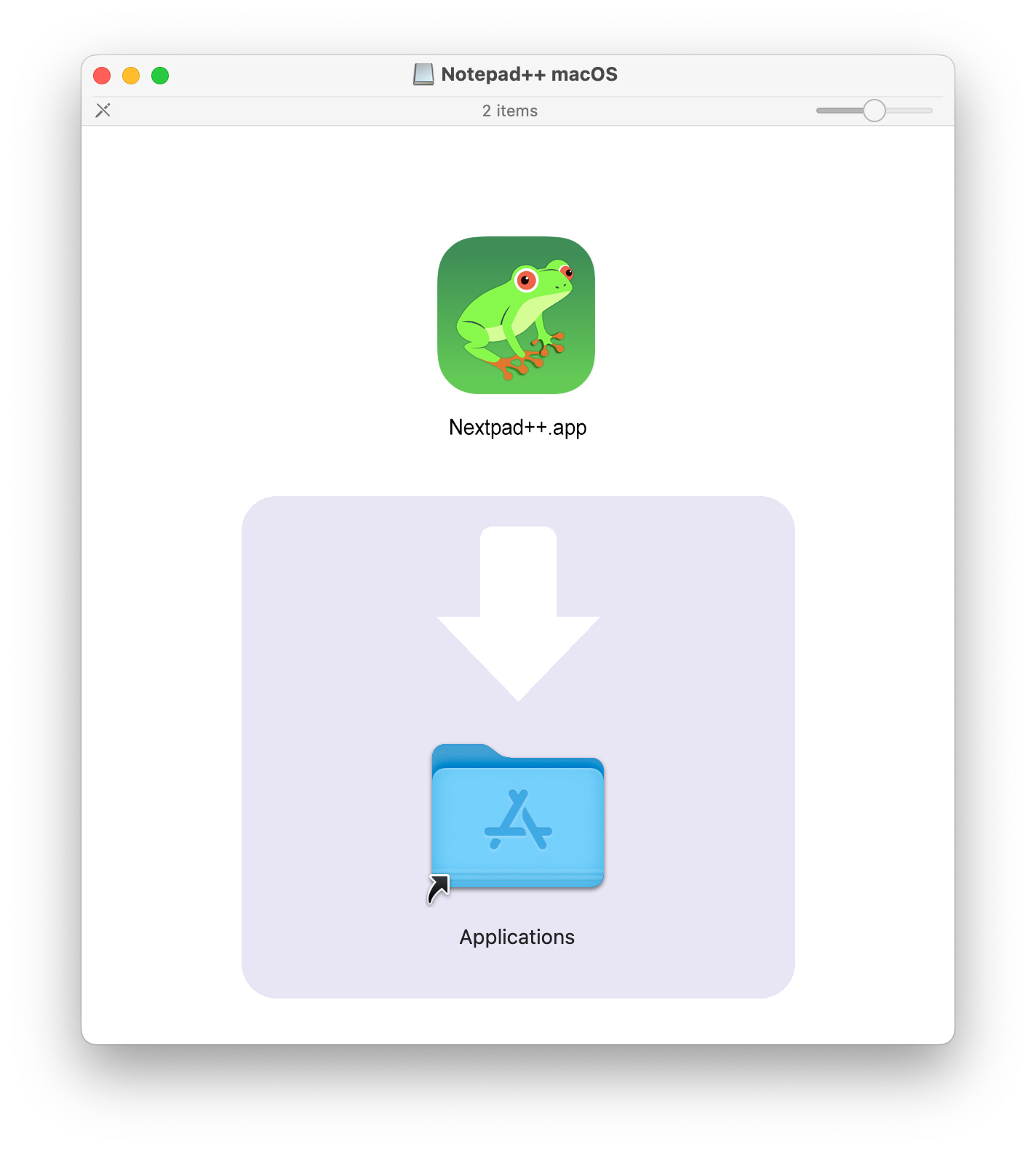
- Download the DMG file above
- Open the downloaded
.dmgfile - Drag Nextpad++ to your Applications folder
- Launch Nextpad++ from Applications or Spotlight
Every release is code-signed with an Apple Developer ID certificate and notarized by Apple — Gatekeeper accepts the app without any "unidentified developer" warning the first time you open it.
Nextpad++ Version Check
- Click on the
Nextpad++Menu - Look at the
Check for Updatesitem - Green light - your Nextpad++ is up-to-date
- Yellow light - there is a new version available
- No light - you are sitting behind a proxy or a firewall that blocks github
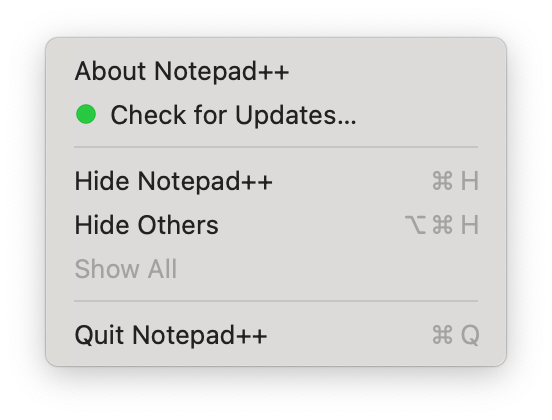
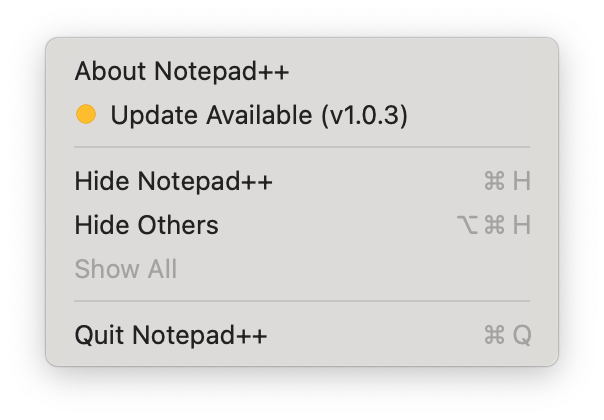
Nextpad++ for Mac doesn't have autoupdate. You simply need to drag old version from your Applications to Trash and download a new version. Everything should work out of the box.
Verifying Your Download
Every release of Nextpad++ for Mac is distributed through Apple's full macOS software-distribution chain, so you can be confident the DMG you download has not been tampered with.
- Code-signed with an Apple Developer ID certificate. Every binary inside the application bundle is cryptographically signed by the developer. macOS will refuse to launch the app if the signature does not match.
- Notarized by Apple. The entire DMG is submitted to Apple's notarization service, which scans each build for malware and known bad signatures and returns a signed ticket confirming the software is safe to run.
- Ticket stapled to the DMG. The notarization ticket is embedded directly in the file, so Gatekeeper on your Mac can verify the software is notarized without needing an internet connection.
- Built from public source. The exact commit used to produce each release is tagged in the GitHub repository, so anyone can audit or rebuild the software independently.
Verify the signature yourself
After installing Nextpad++, open Terminal and run these two commands:
codesign -dv --verbose=4 /Applications/Nextpad++.app
spctl -a -vvv -t execute /Applications/Nextpad++.app
The first command prints the signing identity and certificate chain embedded in the application bundle. The second command asks Gatekeeper to re-evaluate the app and confirm it is notarized and accepted for execution. On a healthy install both commands should succeed without any warnings, and spctl should report source=Notarized Developer ID.
No telemetry, no analytics, no ads
Nextpad++ for Mac contains no telemetry, no analytics inside the application, no advertising, and no data collection of any kind. The editor does not phone home, track usage, or send crash reports automatically. The only network traffic the app ever makes is when you explicitly use the Plugin Admin to browse or install plugins, which fetches the public plugin registry from GitHub.
Frequently Asked Questions
Is Nextpad++ for Mac free?
Yes. Nextpad++ for Mac is completely free and open source under the GNU General Public License v3. There are no ads, subscriptions, in-app purchases, or paid upgrades — the version you download is the full version.
Will Nextpad++ work on M1, M2, M3, M4, or M5 Mac?
Yes. Nextpad++ for Mac is built as a Universal Binary with a native arm64 slice, so it runs at full speed on every Apple Silicon chip (M1 through M5) without Rosetta translation. It also includes a native x86_64 slice for Intel Macs.
Is Nextpad++ for Mac safe to download?
Yes. Every release is code-signed with an Apple Developer ID certificate and notarized by Apple, which scans each build for malware. The notarization ticket is stapled to the DMG so macOS Gatekeeper can verify it offline. The full source is public on GitHub and each release is tagged with the exact commit used to build it, so anyone can audit or rebuild the software independently.
How do I install Nextpad++ on Mac?
Download the DMG, double-click to open it, drag the Nextpad++ icon to your Applications folder, then launch the app from Applications or Spotlight. Because the build is notarized by Apple, macOS will not show an "unidentified developer" warning the first time you open it.
Does Nextpad++ for Mac need Wine, CrossOver, or Rosetta?
No. This is a native independent port of the Notepad++ source code, rewritten on top of native macOS Cocoa APIs. It does not require Wine, CrossOver, Porting Kit, or any other Windows compatibility layer. Apple Silicon users do not need Rosetta — the app has a native arm64 slice.
What macOS version do I need to run Nextpad++?
Nextpad++ for Mac requires macOS 11 (Big Sur) or later. It runs on macOS 11 through the current macOS release, on both Apple Silicon (M1-M5) and Intel processors.
Previous Releases
Every past version of Nextpad++ for Mac is available on the GitHub releases page. Each release is tagged to the exact commit used for that build, so you can pin to a specific version or audit the source for any previous release.
Show details
- New plugin APIs:
NPPM_GETCURRENTLANGTYPE,NPPM_GETLANGUAGENAME,NPPM_SETPLUGINSUBSCRIPTIONS - Hardened
NPPM_SETMENUITEMCHECK: rejects spuriouscmdID=0calls that corrupted submenu checkmarks - Plugin Admin improvements and additional ported plugins
Show details
- Bug fixes for file dialogs, keyboard shortcuts, and dark-mode rendering
- Tightened macOS Cocoa integration and tab management
- Plugin loader hardening for community
.dylibplugins
Show details
- First public release: native macOS application for Apple Silicon and Intel Macs
- Universal Binary (arm64 + x86_64), Developer ID signed, Apple notarized
- Core Notepad++ features: syntax highlighting for 80+ languages via Scintilla and Lexilla
- Plugin system loading native macOS
.dylibplugins - Native Cocoa UI: file dialogs, menus, keyboard shortcuts, dark mode, split view
Other Ways to Install
Homebrew Cask — a Homebrew cask for Nextpad++ for Mac is available.
brew tap nextpad-plus-plus/nextpad
brew install --cask nextpad
or
brew install --cask nextpad-plus-plus/homebrew-nextpad/nextpad
Build from source — clone the nextpad-plus-plus-macos repository and build locally with CMake and AppleClang (Xcode command-line tools). The README covers the full build instructions. Building from source lets you audit the exact code that runs on your machine.
Learn More
Browse the plugin catalog to see which Notepad++ plugins are already ported to macOS. Read about the project for background on the port, the architecture, and what's different from the Windows version. Check resources for documentation, keyboard shortcuts, and community links. If you find a bug or want to contribute, open an issue or pull request on the GitHub repository.